ForeverSuite
19 downloads Updated 1 game version
Screenshots
About
From the README
A customizable, modular interface for WoW Forever.
ForeverSuite brings your everyday interface tools together in one Control Center.Choose a visual theme, configure the modules you use, and save your setup in aprofile. Made by DeluxiZ.
Current release: 0.8.5 · Client: WoW Forever · Interface: 16001
Features
- Guided setup: a welcome screen, patch notes, ten visual themes with previews,accessibility presets, and quick module choices.
- Consistent customization: module colors, font family, size and outlinesettings, plus movable and resizable supported frames with a centered grid.
- Action bars and unit frames: configurable bar appearances, player and targetframes, portraits, and cast bars.
- Nameplates: a layout designer, health and cast information, saved NPC rules,and emphasis for selected important spells.
- Bags and vendors: inventory categories, favorites, recent items, stock tools,configurable junk selling and repairs, item checklists, and manual buyback.
- Map and quests: a themed map interface, coordinates, saved pins, a questtracker, automatic quest waypoints, a smooth direction arrow, minimap ant trails,and a waypoint queue.
- Chat, social and guild: separate modules, chat appearance options, keywordhighlights, optional chat copying, private guild notes, favorites, and optionalrecent-group history.
- More everyday tools: loot and leveling session summaries, cooldown and bufftools, professions, auction information, and equipment durability tracking.
- Profiles and settings tools: profile import/export, automatic backups,character assignments, settings search, favorites, and undo for reversiblesettings changes.
Previews
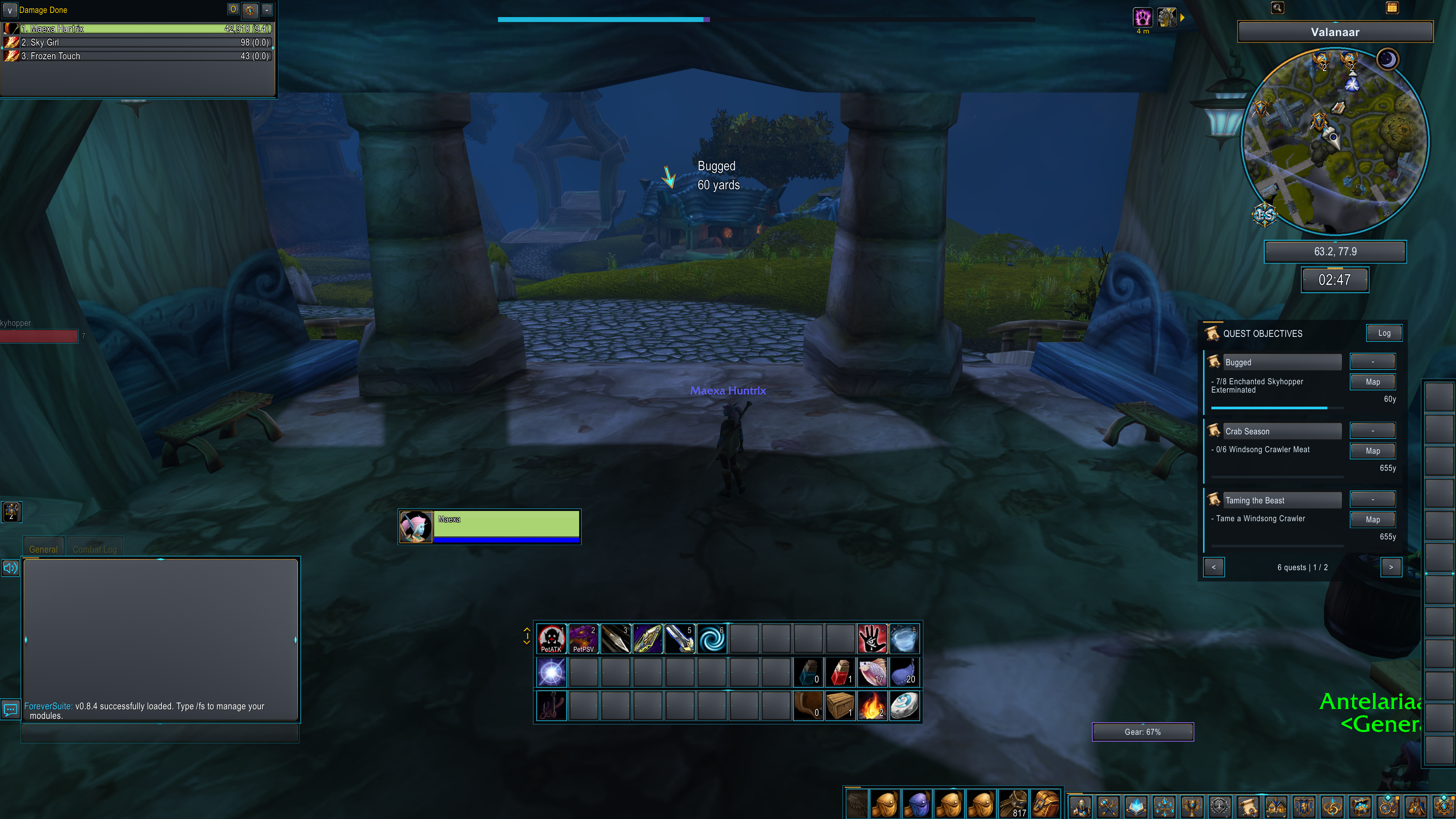
In-game interface

An in-game screenshot supplied by the author. Module choices, appearance andframe placement are configurable; this is one example layout.
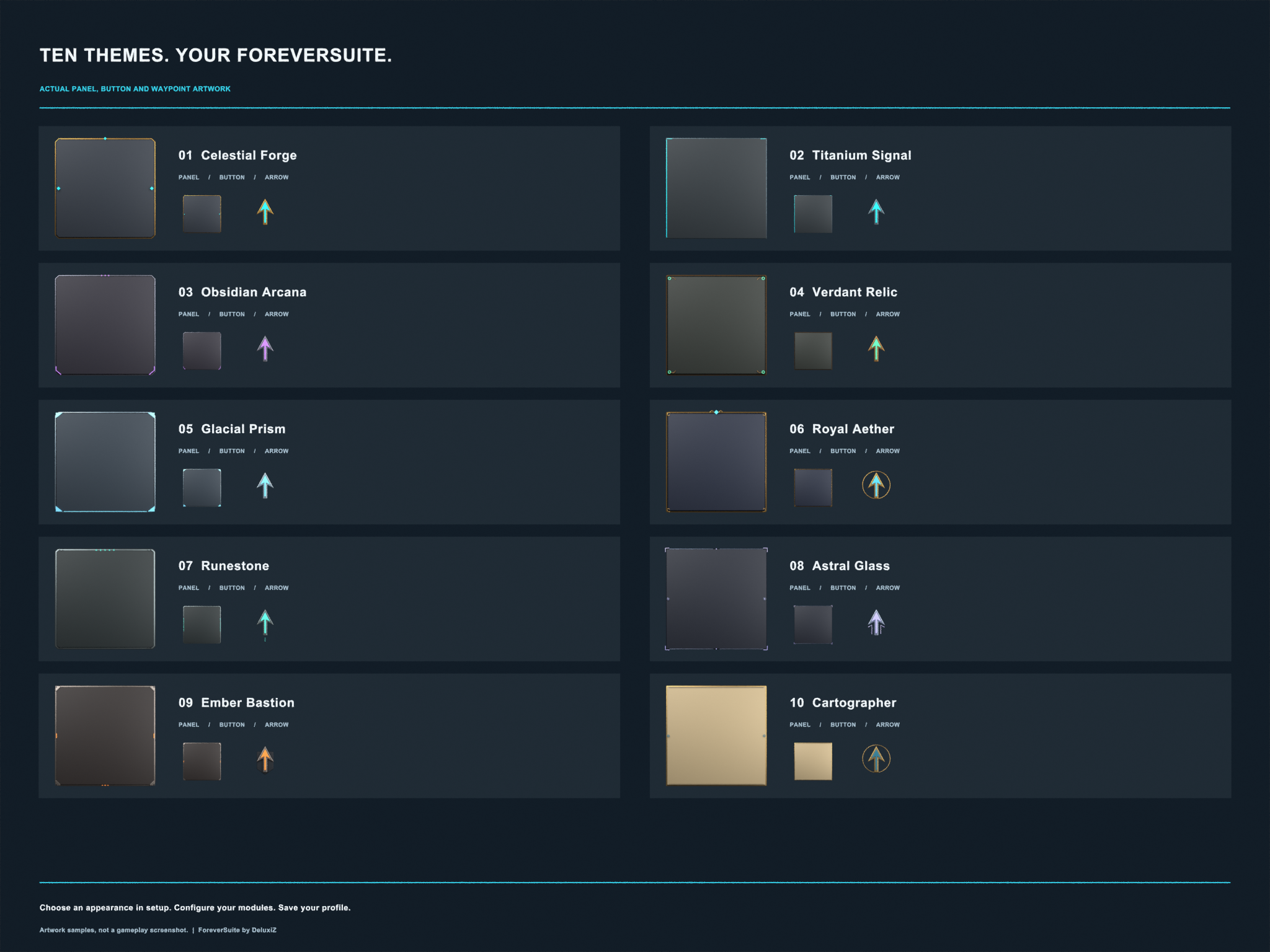
See the artwork for all ten themes

These samples show the actual theme textures used by the addon. This comparisonis an artwork sheet, not a gameplay screenshot or a promised window layout.
Installation
Download the attached ForeverSuite ZIP from this repository's Releasespage.
Extract the
ForeverSuitefolder into your WoW Forever installation:World of Warcraft/_forever_/Interface/AddOns/ForeverSuite/Check that
ForeverSuite.tocis directly inside that folder. Avoid an extranestedForeverSuite/ForeverSuitefolder.Enable ForeverSuite in the game's AddOns list, then log in. If you updated itwhile the game was open, type
/reloadafter copying finishes.
Download the release ZIP attached by the author rather than GitHub's automaticallygenerated source archive.
Getting started
The first-use setup lets you preview an appearance before applying it. You canskip setup and return later with /fs setup.
Open /fs to access the Control Center. Click a module card to open its settings,or use its Enabled button to toggle the module. Profiles remain accessible acrossthe Control Center's module pages.
Use Move Frames to reposition supported elements and drag their resize gripsto change scale. Native secure action-bar placement remains controlled by thegame. Leave combat before making layout changes.
Open More tools / search for profile transfers, settings search, favorites,alerts, notes, checklists, session information, and waypoint queues.
Commands
| Command | Action |
|---|---|
/fs | Open the Control Center |
/fs setup | Reopen guided setup |
/fs tools | Open More tools / search |
/fs undo | Undo the last supported settings change |
/fs status | Show client and compatibility information |
/fs errors | Show blocked addon actions recorded during this session |
/fs audit | Open maintenance and layout diagnostics |
Waypoint navigation
Enable navigation in the Map module and select the automatic quest options youprefer. Quest navigation depends on location information exposed by the client.
- Left-click the waypoint arrow to open the map.
- Right-click the arrow to stop navigation.
- To resume a quest waypoint, enable Follow clicked quest and click Mapbeside that quest in the ForeverSuite quest tracker.
Ant trails point directly toward the destination. They do not calculate routesalong roads or around terrain.
Local data
Chat capture and recent-group tracking are optional. Chat copying keeps up to 200messages for the current session. Guild notes are private addon notes; they donot edit public or officer notes.
Profile exports omit private guild notes, recent-group history, and recordedhistories. Undo applies to supported settings changes, not purchases, sales,messages, or other game actions.
Compatibility and testing
ForeverSuite targets WoW Forever. Compatibility with Retail or other Classicclients is not established. Some features require client APIs that may beunavailable or restricted; those features skip unreadable data.
The current development checks cover 252 offline scenarios, Lua startup,runtime textures, and targeted map regressions. Offline checks do not reproduceevery aspect of the game. Live verification of combat-related action-bar overlapand UI flicker remains open. Reported logout/quit blocking has received changesto native callback handling and still requires in-game verification.
Reporting issues
Open an issue in this repository and include:
- Your ForeverSuite version and the output of
/fs status. - What you expected, what happened, and steps to reproduce it.
- A screenshot or the complete error text, where available.
- Relevant output from
/fs errorsfor blocked-action warnings. - Whether it also happens with other interface addons disabled.
Please remove personal information from screenshots and logs before posting.
Documentation
License
ForeverSuite is licensed under the MIT License.Copyright © 2026 DeluxiZ.
Third-party components, fonts and assets retain their respective copyright andlicensing terms. See COPYRIGHT.txt.
Credits
Created by DeluxiZ, with AI-assisted development and original Blender-renderedtheme assets.
Copyright © 2026 DeluxiZ. See COPYRIGHT.txt.
ForeverSuite is a community project and is not affiliated with BlizzardEntertainment. Third-party assets and fonts retain their respective licensingterms.
WowUp installs ForeverSuite and keeps it up to date, along with the rest of your addons.
Download WowUp